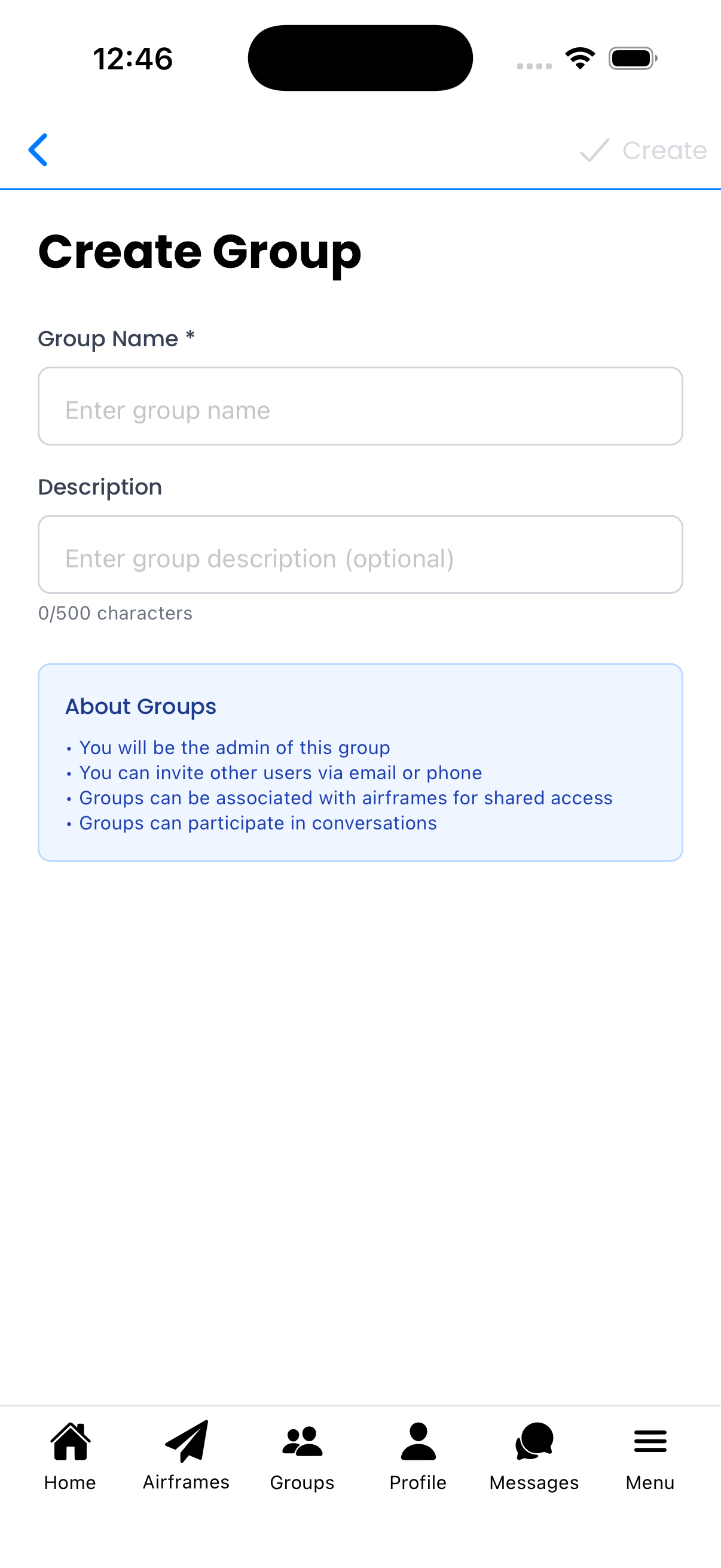
Create Group
Create a new group to collaborate with other users. You'll become the admin of any group you create.
Group Information
- Group Name - Required. Choose a descriptive name (e.g., "P1903 Mechanics", "Flying Club")
- Description - Optional. Explain the group's purpose (up to 500 characters)
What Groups Can Do
As shown in the info box:
- You will be the admin - Full control over group settings and members
- Invite users - Send invitations via email or phone
- Share aircraft - Associate airframes with the group for shared access
- Team conversations - Add the group to conversations for team visibility
Creating the Group
- Enter a Group Name
- Optionally add a Description
- Tap Create in the top-right corner
After creation, you'll be taken to the Group Details screen where you can:
- Invite members via email or phone
- Configure join settings
- Share the QR code for easy joining
Tips
- Use clear, descriptive names so members know what the group is for
- Include your organization or aircraft in the name (e.g., "N12345 Owners")
- The description helps new members understand the group's purpose
- Group creation may be limited based on your subscription tier