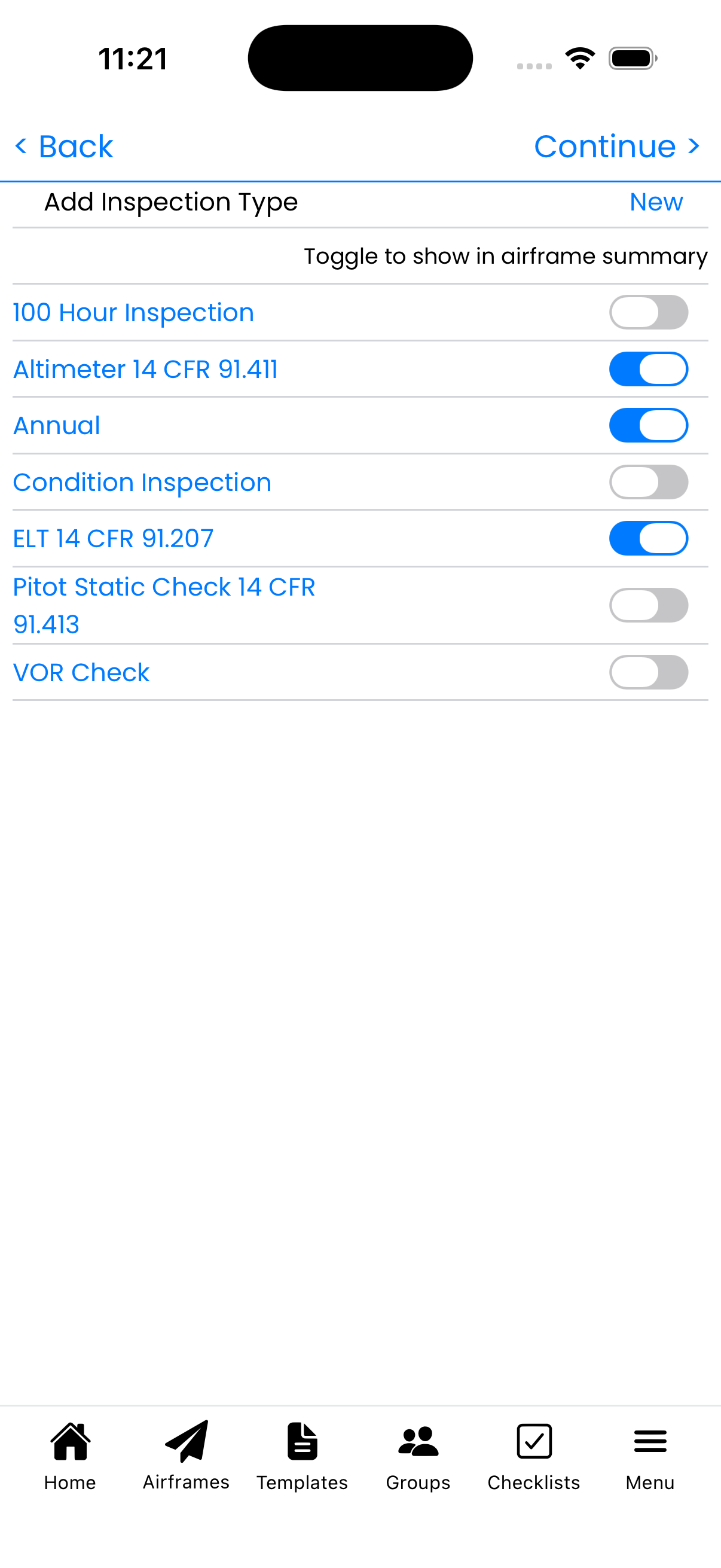
Wizard Step 4: Inspection Types
Select which inspections to track for your aircraft. These will appear on your status dashboard and help you stay compliant.
Select Inspection Types
Toggle on the inspections that apply to your aircraft:
- Annual - Required yearly inspection (14 CFR 91.409)
- 100 Hour Inspection - For aircraft used for hire
- Altimeter 14 CFR 91.411 - Every 24 months for IFR
- ELT 14 CFR 91.207 - Emergency Locator Transmitter
- Pitot Static Check 14 CFR 91.413 - Every 24 months for IFR
- VOR Check - Every 30 days for IFR
- Condition Inspection - For experimental aircraft
Required vs Optional Inspections
Required for all aircraft:
- Annual (or Condition Inspection for experimental)
- ELT check
Required for IFR operations:
- Altimeter/Static System check
- Pitot Static check
- VOR check (every 30 days)
Required for commercial operations:
- 100 Hour Inspection
Creating Custom Types
Tap New to create a custom inspection type for:
- Manufacturer-recommended inspections
- Service bulletin compliance
- Phase inspections for progressive programs
- Any recurring inspection unique to your aircraft
Tips
- Select all inspections that apply - you can remove them later
- For IFR aircraft, enable Altimeter and Pitot Static checks
- You can add more inspection types later from Aircraft Setup
- Each enabled inspection will show on your aircraft status display