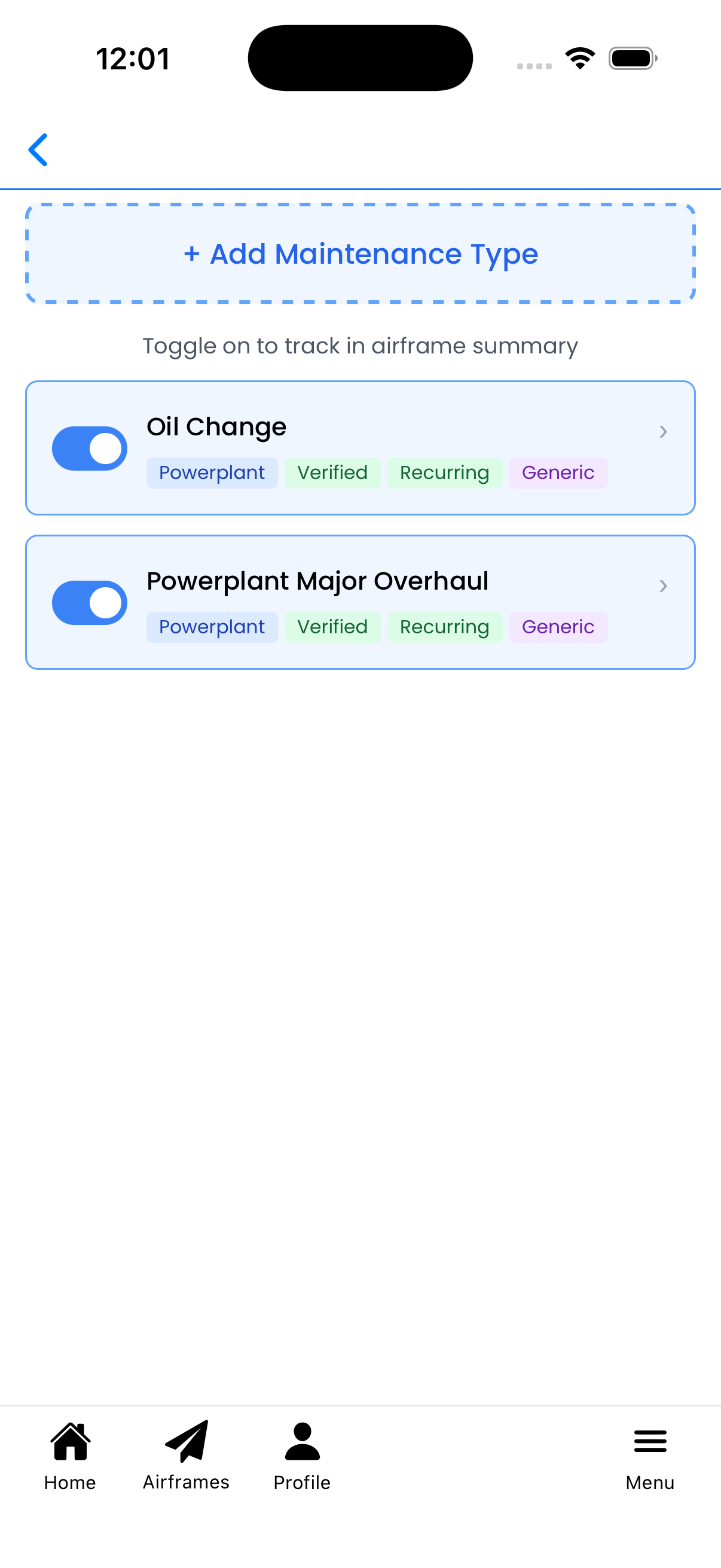
Choose which maintenance types to track for this aircraft. Tracked maintenance items appear on the Aircraft Details screen with status indicators showing when they're due.
What You Can Do Here
Toggle maintenance on/off - Use the switch to track or untrack a maintenance type for this aircraft
Add new maintenance types - Create custom maintenance types specific to your aircraft
Edit maintenance types - Tap any maintenance type to modify its details
View maintenance details - See descriptions and applicable component tags
Toggle Switches
Each maintenance type has a toggle switch on the left side:
Blue (ON) - This maintenance type is being tracked for your aircraft. It will appear on the Aircraft Details screen with status indicators.
Gray (OFF) - This maintenance type is not tracked. It won't appear in your aircraft summary.
Simply tap the toggle to switch between tracked and untracked. Changes are saved automatically.
Blue toggles indicate tracked maintenance types
Maintenance Type Cards
Each card displays information about a maintenance type:
Title - The name of the maintenance (e.g., "Oil Change", "Powerplant Major Overhaul")
Description - Optional details about the maintenance (shown below the title)
Tags - Colored badges indicating properties:
Airframe - Applies to the airframe
Powerplant - Applies to engines
Propeller - Applies to propellers
Verified - Standard maintenance verified by Logbook
Recurring - Has a recurring schedule
Generic - Generic type applicable to multiple aircraft
Tap anywhere on the card (except the toggle) to open the maintenance type editor.
Adding Maintenance Types
To create a new maintenance type:
Tap the + Add Maintenance Type button at the top of the screen
Fill in the maintenance details (title, description, applicable components)
Set up recurring intervals if needed
Save the new maintenance type
The new type will appear in the list - toggle it on to start tracking
Tip: Create custom maintenance types for aircraft-specific items like landing gear inspections or avionics checks.
Common Maintenance Types
Logbook includes several pre-configured maintenance types:
Oil Change - Regular engine oil and filter replacement
Powerplant Major Overhaul - Engine overhaul tracking
Propeller Overhaul - Propeller inspection and overhaul
Spark Plug Replacement - Ignition system maintenance
Fuel Filter Change - Fuel system maintenance
Brake Inspection - Landing gear brake system checks
These verified types have standard intervals but can be customized for your specific aircraft.
Tips
Track what matters - Only toggle on maintenance types relevant to your aircraft and operating procedures
Oil changes - Most aircraft need oil change tracking - this is one of the most common recurring items
Component-specific - Use the Powerplant tag for engine items and Propeller tag for prop-specific maintenance
Changes save automatically - Toggle changes are saved immediately, no save button needed
Permission required - You need Maintainer or higher permission to access this screen
Setup Maintenance Types screen showing maintenance items with toggle switches