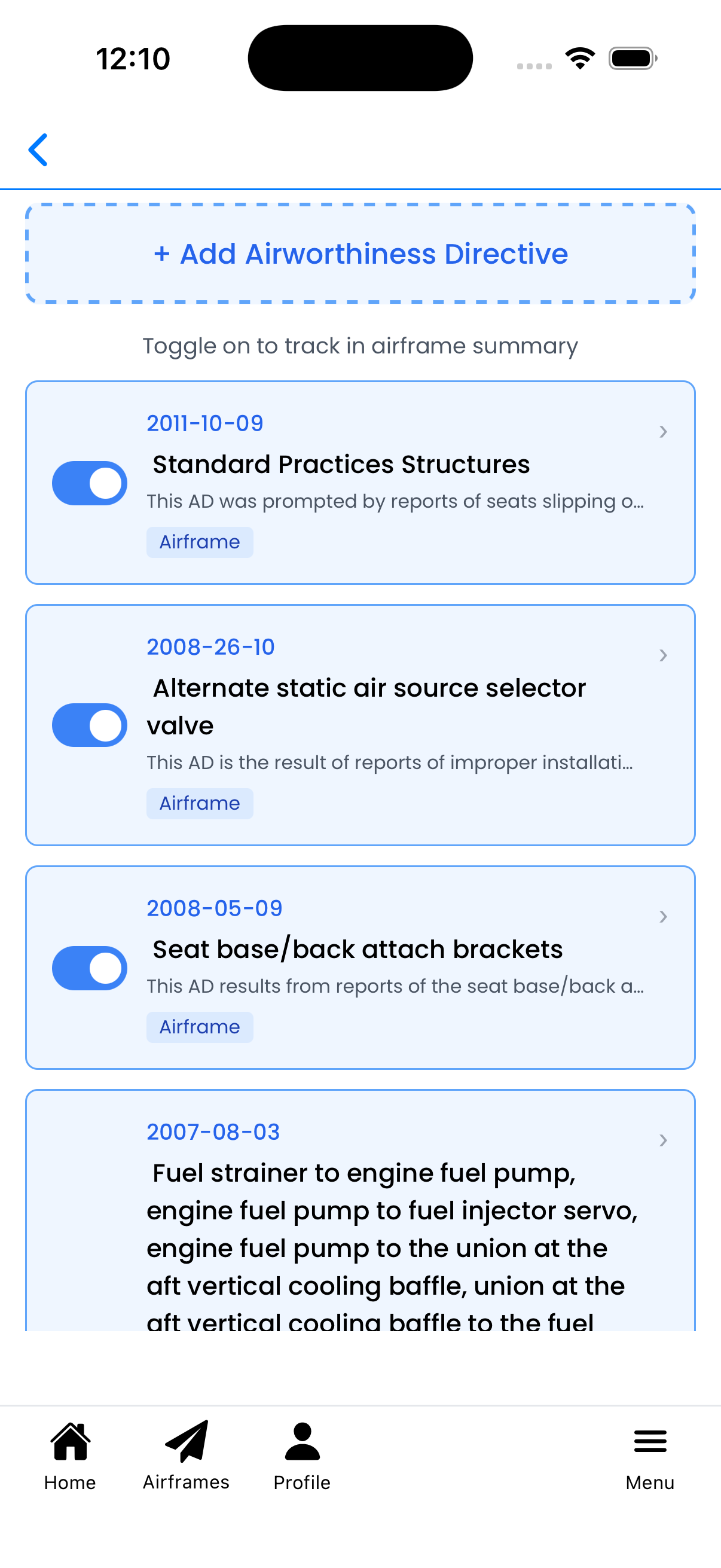
Choose which Airworthiness Directives (ADs) to track for this aircraft. Tracked ADs appear on the Aircraft Details screen with compliance status indicators.
What You Can Do Here
Toggle ADs on/off - Use the switch to track or untrack an AD for this aircraft
Add new ADs - Create custom AD entries for your aircraft
Edit AD details - Tap any AD to modify its information
View AD details - See FAA document numbers, descriptions, and applicable components
Toggle Switches
Each AD has a toggle switch on the left side:
Blue (ON) - This AD is being tracked for your aircraft. It will appear on the Aircraft Details screen with compliance status.
Gray (OFF) - This AD is not tracked. It won't appear in your aircraft summary.
Simply tap the toggle to switch between tracked and untracked. Changes are saved automatically.
Blue toggles indicate tracked ADs
AD Cards
Each card displays information about an Airworthiness Directive:
FAA Document Number - Blue text showing the official AD number (e.g., "2011-10-09")
Title - The name or subject of the AD
Description - Preview of the AD details (shown below the title)
Tags - Colored badges indicating properties:
Airframe - Applies to the airframe
Powerplant - Applies to engines
Propeller - Applies to propellers
Verified - AD verified by Logbook
Recurring - Has recurring compliance requirements
Tap anywhere on the card (except the toggle) to open the AD editor.
Adding Airworthiness Directives
To add a new AD, tap the + Add Airworthiness Directive button at the top of the screen. This opens the Add Airworthiness Directive screen where you can:
Select from pre-matched ADs - The system uses AI to suggest ADs that may apply to your aircraft based on type certificate data
Search the FAA database - Find any AD by title, document number, docket number, or aircraft model
View full AD documents - Read the official FAA text before applying
Once added, the new AD will appear in this list - toggle it on to start tracking compliance.
Tip: Check the pre-matched suggestions first - they're filtered specifically for your aircraft's make, model, and installed components.
Understanding Airworthiness Directives
Airworthiness Directives are legally enforceable rules issued by the FAA:
One-time ADs - Require a single compliance action (inspection, repair, or modification)
Recurring ADs - Require repeated inspections or actions at specified intervals
Emergency ADs - Require immediate compliance due to safety concerns
ADs are identified by their FAA document number in the format YYYY-MM-DD (e.g., "2011-10-09").
Important: Compliance with applicable ADs is required to maintain aircraft airworthiness. Always verify AD applicability with official FAA sources.
Tips
Sorted by date - ADs are sorted with newest first based on FAA document number
Track all applicable ADs - Make sure to track every AD that applies to your specific aircraft
Recurring ADs - Pay special attention to ADs marked as recurring - these require ongoing compliance
Changes save automatically - Toggle changes are saved immediately, no save button needed
Permission required - You need Maintainer or higher permission to access this screen
Setup ADs screen showing airworthiness directives with toggle switches